Add Websites to Intervention [iOS]
Learn how to easily add specific websites to your one sec interventions on your iPhone or iPad using the Safari extension.
Last updated 7 months ago
Article Content:
To intervene when opening distracting websites on your iPhone or iPad, you first need to have the one sec Safari Extension installed and enabled. (If you haven't done this yet, please follow our Safari Extension Setup Guide first).
How to add a website to one sec:
When visiting a distracting website that you want to configure with an intervention:
Open the website in Safari.
Tap on the extension button (the puzzle piece or
aAicon) in the bottom left of your address bar.Select one sec from the menu.
Tap Add website to one sec.
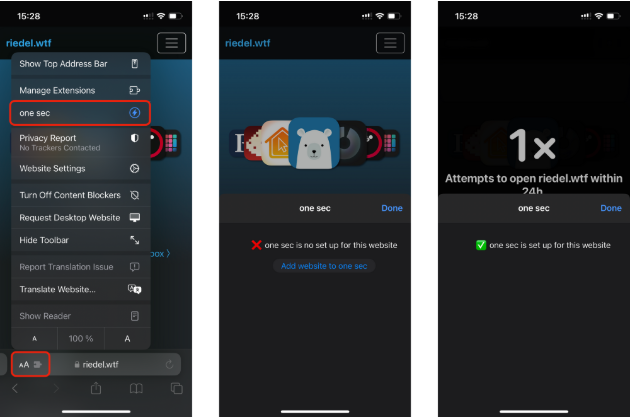
(Note: If you would like to completely block websites instead of just adding a breathing intervention, please refer to our App & Website Blocking Tutorial.)
Was this helpful?
Still need help? Ask the team