Stuck in an endless loop [iOS]
Is your target app opening and closing in an endless loop? Learn how to fix a common configuration error in the Apple Shortcuts app to restore normal one sec behavior.
Last updated 7 months ago
Article Content:
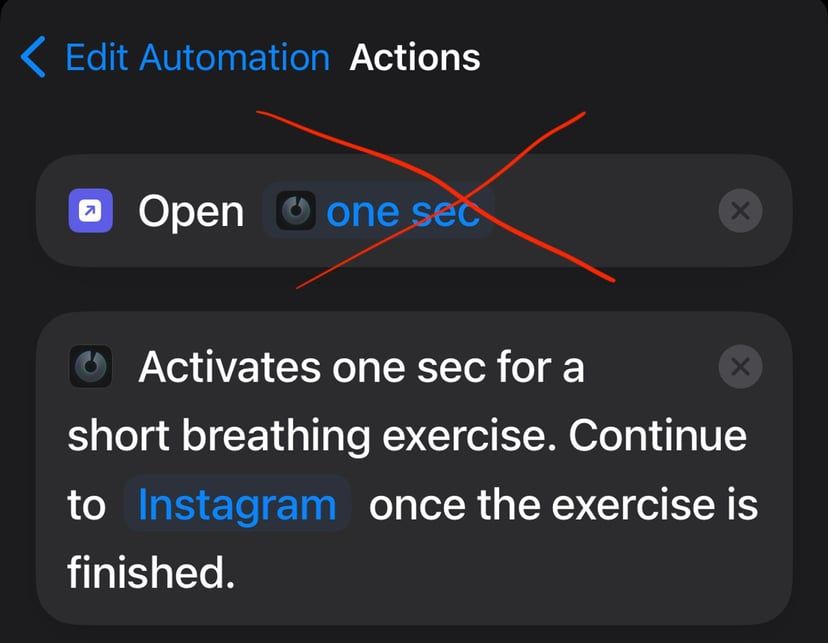
If your target app is opening and closing in an endless loop whenever you trigger an intervention, it is very likely that you’ve accidentally added an “Open App” action before the actual one sec action in your automation.
The Problem
The one sec action itself is already responsible for opening the target app after you finish the breathing exercise. If you add an additional "Open App" action at the beginning of the automation, it triggers the automation again, creating an infinite loop.
How to fix it:
Open the Shortcuts app on your iPhone.
Go to the Automation tab.
Select the automation for the app that is looping.
Look at the Actions list:
❌ Remove the action that says "Open [App Name]".
✅ Keep only the action that says "Activates one sec for a short breathing exercise...".
Still having trouble?
If you're unsure how the automation should look, please refer to our step-by-step guide for the initial configuration:
👉 Initial Setup Tutorial for iOS
Was this helpful?
Still need help? Ask the team